Docker
Compose + Machine + Swarm
Created by Linh Tran
Introduction
A set of native orchestration services with the ambition to cover the entire devops flow from local box to big cluster in the cloud!
Sound intimidating?
The good news is that even for a every day developer, these tools can still easily applied and make the earth a little better place
Warning!!!
No need to use all of Compose, Machine, Swarm together. Use whatever tools and combinations you needs.
Everything is alpha & beta. Prepare to sweat a litter!
Compose
Compose - Intro
- Previously Fig
- Initially, main purpose is to create fast, isolated development environments using Docker
- But now, is to defining and running complex applications. One command to rule them all (just more beautiful words)
- Great for dev, test, CI. Not ready for production
Before Compose
$ docker run -d -it --name redis redis
$ docker run -d -it --name postgres linhmtran168/postgres
$ docker run -d -it --name web \
-v ~/Dev/gitlab.com/linhmtran168/test-project:/var/www/html \
--link postgres:db --link redis:redis linhmtran168/php-web
$ docker run -d -it -p 80:80 --name nginx \
--link web:web --volumes-from web linhmtran168/php-nginx
$ docker run -d -it --name node --link web:web \
--volumes-from web linhmtran168/gulp-bower
After Compose
- Define your containers and volumes in docker-compose.yml file
- Run
$ docker-compose up - Grab a cup of coffee
Compose YML file
With Compose, you define all your containers configuration in a yml file
  ...
  web:
  build: .
  links:
    - redis:redis
    - postgres:db
  volumes:
    - .:/var/www/html

  nginx:
  build: ../docker-php-nginx
  ports:
    - "80:80"
  links:
    - web:web
  volumes_from:
    - web
  ...
Compose YML file - cont
- A project can have multiple .yml file, one for dev, one for test and one for production (not recomend now)
- Default, Compose will use docker-compose.yml file. Switch between the using:
$ docker-compose -f test.yml
Compose CLI
- All of them
$ docker-compose --help
Some of interesting ones
- Create and start containers
$ docker-compose up
$ docker-compose scale web=3
Compose in Production?
- Compose can be used in production by setting DOCKER_HOST, DOCKER_TLS_VERIFY, and DOCKER_CERT_PATH env variables. But using docker-machine is recommended
- Use a separate .yml file is recommended
- It's not ready for production (expect downtime when deploy). See roadmap here
Machine
Machine - Intro
Do I look like a boss?
  $ docker-machine ls
  NAME           ACTIVE   DRIVER       STATE     URL                         SWARM
  dev                     virtualbox   Running   tcp://192.168.99.104:2376
  ec2                     amazonec2    Running   tcp://52.74.133.250:2376
  master                  virtualbox   Running   tcp://192.168.99.105:2376
  swarm-master            virtualbox   Running   tcp://192.168.99.106:2376   swarm-master (master)
  swarm-node-1            virtualbox   Running   tcp://192.168.99.107:2376   swarm-master
  swarm-node-2            virtualbox   Running   tcp://192.168.99.108:2376   swarm-master
Machine - Intro - cont
Create and manage Docker hosts on your computer, on cloud providers and inside your own data center (in the future), also automate commication with local docker client.
Why Machine?
- Forget boot2docker. Though, Machine still use boot2docker in local environment
-
Never have to set Docker env variables explicitly
$ export DOCKER_HOST=tcp://192.168.59.103:2376 $ export DOCKER_CERT_PATH=/Users/mary/.boot2docker/certs/boot2docker-vm $ export DOCKER_TLS_VERIFY=1 - Manage and switch between both local and remote Docker host with ease
Machine - Quick start
-
Create a local VM
$ docker-machine create --driver virtualbox dev - Or a remote one (Machine currently only support some driver like Amazon, DO...)
$ docker-machine create -d amazonec2 --amazonec2-access-key "..." \ --amazonec2-secret-key "..." --amazonec2-vpc-id "..." \ --amazonec2-subnet-id "..." --amazonec2-instance-type "t2.small" \ --amazonec2-region "ap-southeast-1" --amazonec2-zone "b" test-ec2 -
Then set the env variables for Docker client
$ eval "$(docker-machine env dev)" # or test-ec2
Machine - Quick start - Cont
- Now all the docker and docker-compose command will be against the previously set host
- So now you can use docker-compose to provision your EC2, DO, Azure... right in your local box
Machine - Drawbacks
- It's beta. Network problem with virtualbox driver (#986,fixed in master)
- Depend on driver. Setup to run against a custom host and service is hard
Swarm
Swarm - Intro
Native clustering for Docker. It turns a pool of Docker hosts into a single, virtual host.
Swarm - Intro
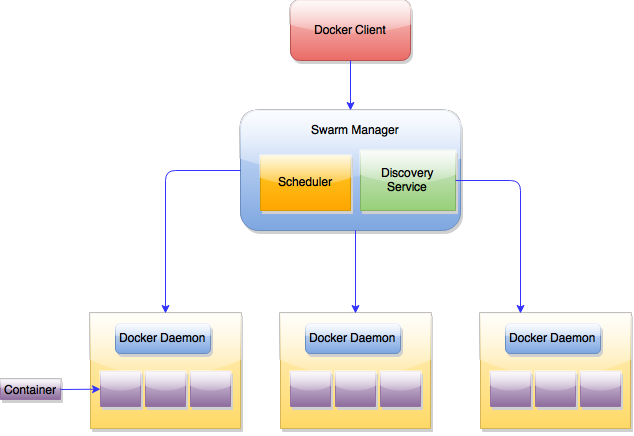
Create a Swarm cluster - Manually
- Create the cluster
$ docker run --rm swarm create 6856663cdefdec325839a4b7e1de38e8 cluster_id -
Create nodes, log into each of them and:
-
Start docker deamon
$ docker -H tcp://0.0.0.0:2375 -d -
Register Swarm agent to discovery service
  $ docker run -d swarm join --addr=node_ip:2375 \
    token://cluster_id
-
Start docker deamon
Create a Swarm cluster - Manually
- Start the swarm manager
$ docker run -d -p swarm_port:2375 swarm manage \ token://cluster_id - Run your command
$ docker -H tcp://manager_ip:manager_port your_command
Machine + Swarm
Experimental but much nicer than the mual way
- Create the cluster
$ docker-machine create -d virtualbox manager $ eval "$(docker-machine env local)" $ docker run swarm create 1257e0f0bbb499b5cd04b4c9bdb2dab3 #token - Create the swarm master
  docker-machine create \
      -d virtualbox \
      --swarm \
      --swarm-master \
      --swarm-discovery token://token
      swarm-master
Machine + Swarm
- Create the swarm node
$ docker-machine create \ -d virtualbox \ --swarm \ --swarm-discovery token://token swarm-node-1 - Connect to the swarm master
$ eval $(docker-machine env --swarm swarm-master) - Now all docker command will be again the swarm
Compose + Swarm
- Haven't managed to make it work :(
- And currently if using swarm, it will not work unless all containers are schedule in one host. So what is the point of swarm then
- Check the roadmap for this here
Things for later
- There is a lot of things about Swarm
- Advanced Scheduling
- Filter
- Strategry
- Use another discovery backends (etcd, Zookeeper)
- Integration with Mesos, Kubernetes
Swarm Conclusion
- In the future, Swarm with Machine and Compose will make cluster devops using container much more easier
- In the moment, there is a lot of drawbacks and should be used for experimental purpose only